
Top 8 European Jira Alternatives
GDPR-compliant project management tools from Europe. Data sovereignty, EU-based support, and alternatives to US software giants.
Last updated: June 2025 · By Stanislav Bruch
Why I Created This Guide
There's a common sentiment in the project management world: "Nothing beats Jira." I hear it constantly. And I'm here to tell you: that's not true.
Don't get me wrong. Jira is powerful, mature, and has set the standard for Agile software development teams. If you're a software team practicing Scrum or Kanban, Jira might genuinely be your best choice.
But Jira isn't for every team. It's complex, US/Sydney based, cloud only and has a steep learning curve. Agencies, construction firms, and countless other organisations don't need the complexity that Jira brings.
🇪🇺 Why Focus on European Alternatives?
- Data Sovereignty: Keep your data in the EU, under EU jurisdiction.
- No CLOUD Act: Your data isn't subject to US government data requests.
- Local Support: European time zones, European languages.
- Supporting European Tech: Great software is built everywhere, not just Silicon Valley.
This guide focuses exclusively on European project management tools. Whether you're required to use EU-based solutions for compliance reasons, or you simply prefer to support European software companies, these 8 alternatives offer world-class features without sending your data across the Atlantic.
Quick Comparison
| Tool | Country | Best For | Capterra | Starting Price | Self-hosted | Free Plan |
|---|---|---|---|---|---|---|
| Easy Redmine | 🇨🇿 Czech Republic | Atlassian replacement | ⭐ 4.4 | €6.90/user/mo | ✓ | ✗ |
| OpenProject | 🇩🇪 Germany | Open-source teams | ⭐ 4.6 | Free (open-source) | ✓ | ✓ |
| YouTrack | 🇨🇿 Czech Republic | Software developers | ⭐ 4.4 | Free (≤10 users) | ✓ | ✓ |
| MeisterTask | 🇩🇪 Germany | Visual collaboration | ⭐ 4.6 | Free / €13.50/user/mo | ✗ | ✓ |
| Taiga | 🇪🇸 Spain | Agile teams | ⭐ 4.3 | Free (open-source) | ✓ | ✓ |
| Teamwork | 🇮🇪 Ireland | Agencies & client work | ⭐ 4.5 | Free / $10.99/user/mo | ✗ | ✓ |
| Planisware | 🇫🇷 France | Enterprise PPM | ⭐ 4.2 | Custom pricing | ✓ | ✗ |
| Redmine | 🌍 Open Source | Budget-conscious teams | ⭐ 4.1 | Free (open-source) | ✓ | ✓ |
Ratings from Capterra. Prices verified September 2025. All tools offer GDPR compliance.
How I Evaluate These Tools
This isn't a sponsored ranking. I work at Easy Software, so I'm transparent about that. But I've personally tested or evaluated each tool on this list. Here's what I look for:
GDPR & Data Privacy
EU data hosting, privacy compliance, data sovereignty options
Feature Set
Task management, Helpdesk, Wiki, Agile boards, Gantt charts, time tracking, reporting
Pricing Transparency
Clear pricing, free tiers, value for money
Self-Hosting Option
Can you host it yourself for complete data control?

Easy Redmine
Complete Atlassian replacement from Prague
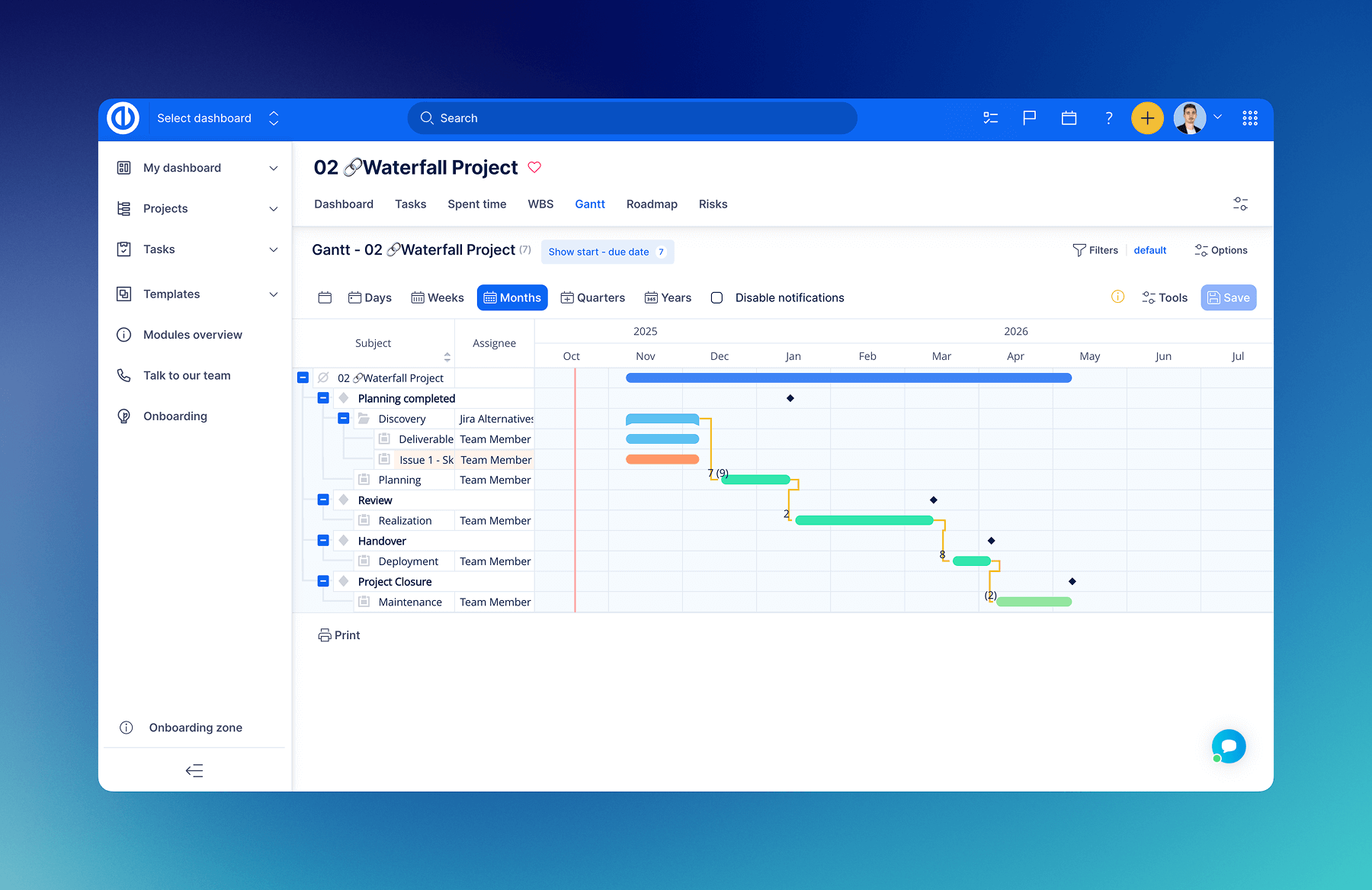
My take: I's my daily tool, genuinely strong Jira alternative with full self-hosting, Knowledge Base, HelpDesk, Easy Gantt, Resource Management, and CRM built-in. If you're migrating from Atlassian and want European data sovereignty, it's worth a look.
Easy Redmine is developed by Easy Software in Prague, Czech Republic. With 4.4/5 on Capterra (105 reviews), it positions itself as a complete Atlassian stack replacement.
Why Choose Easy Redmine?
Easy Redmine is built on top of Redmine (open-source) and adds enterprise features, modern UI, and professional support. It's designed for organisations migrating from Jira who need a comprehensive, self-hosted solution with strong GDPR compliance and European support.
Top Features
- Full project management suite (tasks, Gantt, resources, time tracking)
- Agile boards and sprint planning
- CRM and Help Desk modules
- DevOps integration (Git, CI/CD)
- Self-hosted and cloud options
- GDPR compliant, EU data centres
- Migration assistance from Jira
Drawbacks
- No free tier (only trial)
- UI less polished than newer tools
- Learning curve for full feature set
Pricing
Trial: 30-day free trial
Billing: monthly and annual
- • Essentials: €6.90 / user / month
- • Business: €13.90 / user / month
- • Platform: €19.90 / user / month
- • On-premises: From €25.90 / user / month
Source: Easy Redmine official pricing page · Verified June 2025
OpenProject
Open-source project management from Berlin
My take: OpenProject is the best open-source Jira alternative. It's feature-rich, actively developed, and you can self-host it for free. The German company behind it takes GDPR seriously.
OpenProject is a comprehensive open-source project management solution based in Berlin, Germany. With 4.6/5 on Capterra (187 reviews), it offers everything from classic project management with Gantt charts to Agile boards.
Why Choose OpenProject?
OpenProject is ideal for organisations that want full control over their project data. As true open-source software, you can inspect the code, self-host, and never worry about vendor lock-in. The company is headquartered in Berlin with servers in Germany, making it perfect for EU data requirements.
Top Features
- Complete open-source codebase (GNU GPL v3)
- Professional Gantt charts with dependencies and baselines
- Agile boards (Scrum & Kanban)
- Built-in time tracking and cost reporting
- Team planning and resource management
- BIM and construction project features
Drawbacks
- UI can feel dated compared to newer tools
- Self-hosting requires technical expertise
- Enterprise features require paid plans
Pricing
Trial: Free Community edition (unlimited)
Billing: monthly and annual
- • Community: €0 (free, self-hosted)
- • Basic (Cloud): €5.95 / user / month
- • Professional: €11.95 / user / month
- • Premium: €17.95 / user / month
- • Corporate (On-premises): Custom pricing
Source: OpenProject official pricing page · Verified June 2025

YouTrack
Issue tracking by JetBrains
My take: If you're a JetBrains shop (IntelliJ, WebStorm, etc.), YouTrack is a no-brainer. Free for up to 10 users, and the integration with JetBrains IDEs is seamless.
YouTrack is developed by JetBrains, headquartered in Prague, Czech Republic. With 4.4/5 on Capterra, it's a powerful issue tracker that rivals Jira for software development teams.
Why Choose YouTrack?
YouTrack combines issue tracking with Agile project management, knowledge base, and help desk features. It's built by developers for developers, with an incredibly powerful query language and customisation options. The free tier for up to 10 users makes it accessible for small teams.
Top Features
- Free for up to 10 users (cloud and server)
- Powerful query language for custom searches and reports
- Agile boards with Scrum and Kanban support
- Built-in knowledge base and help desk
- Deep JetBrains IDE integration
- AI assistant included at no extra cost
Drawbacks
- Learning curve for the query language
- Less suited for non-technical teams
- UI can feel complex for simple projects
Pricing
Trial: Free for up to 10 users (unlimited)
Billing: monthly and annual
- • Free: $0 (up to 10 users)
- • Cloud: From $4.50 / user / month (11-25 users)
- • Server: From $900 (15 users, perpetual license)
Source: YouTrack official pricing page · Verified June 2025
MeisterTask
Beautiful Kanban boards from Munich
My take: MeisterTask is the "pretty" option. If your team finds Jira overwhelming, MeisterTask's clean interface will be a breath of fresh air. Great integration with MindMeister for mind mapping.
MeisterTask is developed by Meister (MeisterLabs) in Munich, Germany. With 4.7/5 on Capterra (256 reviews) (the highest rating on this list), it's beloved for its intuitive, visually appealing interface.
Why Choose MeisterTask?
MeisterTask focuses on making project management enjoyable. Its Kanban-based approach is perfect for teams that want visual task management without the complexity. The integration with MindMeister allows you to brainstorm in mind maps and convert ideas directly to tasks.
Top Features
- Beautifully designed, intuitive Kanban boards
- Automations to reduce repetitive tasks
- Time tracking and reporting
- MindMeister integration for brainstorming
- Mobile apps with offline mode
- GDPR compliant with EU data centres
Drawbacks
- No Gantt charts (Kanban-focused)
- Limited for complex project management needs
- No self-hosting option
Pricing
Trial: Free plan available
Billing: monthly and annual
- • Basic: €0 (free, limited features)
- • Pro: €13.50 / user / month
- • Business: €24.00 / user / month
Source: MeisterTask official pricing page · Verified June 2025

Taiga
Open-source Agile platform from Spain
My take: Taiga is the closest open-source equivalent to Jira for Agile teams. If you want Scrum or Kanban without the Jira complexity (or cost), Taiga is excellent. The UI is modern and clean.
Taiga is developed by Kaleidos, a Spanish company. With around 4.4/5 on Capterra, it's purpose-built for Agile teams who want a free, open-source alternative to Jira.
Why Choose Taiga?
Taiga is designed exclusively for Agile workflows. It supports Scrum, Kanban, and a hybrid "Scrumban" approach. The interface is modern and intuitive, making it easy for teams to adopt without extensive training. Being open-source, you can self-host for complete data control.
Top Features
- Scrum: Backlogs, sprints, burn-down charts
- Kanban: WIP limits, swimlanes
- Scrumban: Hybrid approach for flexible teams
- Epics and user stories with story points
- Wiki and documentation per project
- Open-source (AGPL license)
Drawbacks
- No built-in time tracking
- Limited Gantt/waterfall features
- Smaller community than Jira/OpenProject
Pricing
Trial: Free self-hosted (unlimited)
Billing: monthly and annual
- • Self-hosted: €0 (free, open-source)
- • Cloud Free: €0 (limited projects)
- • Cloud Premium: $7 / user / month ($5 annually)
Source: Taiga official website · Verified June 2025
Teamwork
Project management for agencies from Cork
My take: Teamwork is purpose-built for client-facing work. If you run an agency or consulting firm and need to manage client projects with billable time tracking, Teamwork is fantastic.
Teamwork is headquartered in Cork, Ireland. With 4.5/5 on Capterra (600+ reviews), it's specifically designed for agencies and teams doing client work.
Why Choose Teamwork?
Teamwork stands out for client work management. Features like client access portals, billable time tracking, invoicing integration, and project templates make it ideal for agencies. Being headquartered in Ireland means EU data residency and GDPR compliance.
Top Features
- Client access portals for external collaboration
- Billable time tracking with invoicing
- Project templates for repeatable workflows
- Resource management and workload planning
- Built-in chat (Teamwork Chat)
- Profitability tracking per project/client
Drawbacks
- Not designed for Agile software development
- Pricing can add up with multiple products
- No self-hosting option
Pricing
Trial: 30-day free trial
Billing: monthly and annual
- • Free: $0 (up to 5 users)
- • Deliver: $10.99 / user / month
- • Grow: $19.99 / user / month
- • Scale: $54.99 / user / month
- • Enterprise: Custom pricing
Source: Teamwork official pricing page · Verified June 2025

Planisware
Enterprise PPM from Paris
My take: Planisware is enterprise-grade PPM. It's complex and not cheap, but if you're managing a portfolio of hundreds of projects with resource capacity planning, it's one of the best in the world.
Planisware is headquartered in Châtillon, near Paris, France. Founded in 1996, it's a veteran in the Project Portfolio Management (PPM) space, used by major enterprises like Boeing, Coca-Cola, and Pfizer.
Why Choose Planisware?
Planisware is for organisations managing complex portfolios with strategic resource planning. It excels at enterprise-level scenario planning, capacity management, and portfolio optimisation. If you're managing R&D portfolios, capital projects, or large-scale IT initiatives, Planisware offers capabilities that simpler tools can't match.
Top Features
- Advanced portfolio management and optimisation
- Strategic resource capacity planning
- What-if scenario analysis
- Stage-gate process management for R&D
- Financial management and budgeting
- On-premises and cloud deployment options
Drawbacks
- Complex implementation requiring consulting
- Steep learning curve
- Expensive (enterprise pricing)
- Overkill for small/medium teams
Pricing
Trial: Demo available on request
Billing: annual contracts
- • Essential PMO: Starting from ~$1/year (basic)
- • Orchestra: Custom enterprise pricing
- • Enterprise: Custom pricing (typically $50,000+ annually)
Source: Planisware official website · Contact sales for current pricing

Redmine
The original open-source project manager
My take: Redmine is the granddaddy of open-source project management. It's free, battle-tested, and incredibly flexible with plugins. The UI is dated, but if you want zero cost and full control, Redmine delivers.
Redmine is an open-source project management application that's been around since 2006. While originally from Japan, it's maintained by a global open-source community. With 4.1/5 on Capterra, it's the foundation that Easy Redmine and many other tools build upon.
Why Choose Redmine?
Redmine is for teams that want a completely free, self-hosted solution with no vendor dependency. It's highly customisable through plugins and themes. While it requires technical expertise to set up and maintain, it provides complete data sovereignty at zero licensing cost.
Top Features
- 100% free and open-source (GPL v2)
- Issue tracking with custom fields and workflows
- Gantt chart and calendar views
- Time tracking and reports
- Wiki per project
- Hundreds of community plugins
- SCM integration (Git, SVN, Mercurial)
Drawbacks
- Dated user interface
- Requires Ruby on Rails expertise to host
- No official cloud hosting (community options exist)
- Limited Agile features without plugins
Pricing
Self-hosted: Completely free
Managed hosting (third-party):
- • Various providers offer managed Redmine hosting
- • Prices typically range from $10-50/month
- • Or use cloud providers like DigitalOcean/AWS
Source: Redmine official website · Free open-source software
Frequently Asked Questions
Why choose European project management tools over US alternatives?
European project management tools offer GDPR compliance by design, data sovereignty with EU-based servers, and often better support for European time zones and languages. For organisations concerned about data privacy regulations or those required to keep data within the EU, European alternatives provide peace of mind.
Can I self-host these European Jira alternatives?
Yes, several European alternatives offer self-hosting: OpenProject (fully open-source), Redmine (open-source), Taiga (open-source), YouTrack (server license available), and Easy Redmine (on-premises). This provides complete data control and GDPR compliance.
Can I migrate my data from Jira to these European tools?
Most European alternatives support Jira migration. OpenProject offers migration assistance. Easy Redmine has built-in Jira migration tool and migration assistance for enterprise customers. For open-source options like Taiga, community tools and scripts are available to help with migration.
Finding Your European Alternative
The project management landscape extends far beyond Silicon Valley. These eight European alternatives prove that you don't need to send your data across the Atlantic to get world-class project management features.
Whether you prioritise open-source freedom (OpenProject, Redmine, Taiga), developer-focused features (YouTrack), simplicity (MeisterTask), agency workflows (Teamwork), PPM (Planisware), or a complete Atlassian replacement (Easy Redmine), there's a European solution that fits.
Take advantage of free trials and open-source versions to test before committing. Consider your team's actual needs. Complexity isn't always better. And remember: the best tool is the one your team will actually use.
Which Solution is Best for You?
Easy Redmine
Best for: Atlassian stack replacement
Comprehensive project management with self-hosting option. Ideal for organisations migrating from Jira who need full feature parity with European data sovereignty.
OpenProject
Best for: Open-source advocates & public sector
Perfect for organisations that want full transparency, no vendor lock-in, and complete data control. Ideal for public sector, NGOs, and teams that value open-source principles.
YouTrack
Best for: Software development teams
The natural choice for teams already using JetBrains tools. Excellent for small teams (free up to 10 users) who need powerful issue tracking and Agile boards.
MeisterTask
Best for: Teams wanting beautiful simplicity
Ideal for non-technical teams who find Jira overwhelming. Perfect for marketing, HR, and operations teams who want visual task management without complexity.
Taiga
Best for: Agile teams on a budget
The best open-source option specifically for Agile methodologies. Perfect for startups and teams that want Scrum/Kanban without the Jira price tag.
Teamwork
Best for: Agencies & client work
Built for client-facing work with billable time tracking, client portals, and profitability tracking. Perfect for digital agencies, consultancies, and professional services.
Planisware
Best for: Enterprise portfolio management
For large enterprises managing complex portfolios, R&D projects, or capital investments. Powerful scenario planning and resource capacity management.
Redmine
Best for: Budget-conscious technical teams
Completely free, highly customisable, and battle-tested over 18+ years. Best for teams with technical expertise who want zero licensing costs and full control.